

Google’s Gemma 4 is a surprisingly powerful local agentic AI model that can run on local hardware, making it a very welcome addition to my programming suite of tools. In this Blog I will cover my experience with Gemma 4, how to set it up, and some of the things I have been using it for. I will also cover some of the limitations and challenges I have faced with using a local agentic AI model.
Gemma 4 Overview
Gemma 4 comes in a varity of sizes:
| Model | Architecture | Parameters | Active Params | Layers | Context Window | Modalities | Target Hardware |
|---|---|---|---|---|---|---|---|
| E2B | Dense | 2.3B (5.1B w/ emb) | 2.3B | 35 | 128K | Text, Image, Audio | Cloud/Edge |
| E4B | Dense | 4.5B (8B w/ emb) | 4.5B | 42 | 128K | Text, Image, Audio | Laptop/Local |
| 26B A4B | MoE | 25.2B (3.8B active) | 3.8B | 30 | 256K | Text, Image | GPU/Workstation |
| 31B | Dense | 30.7B | 30.7B | 60 | 256K | Text, Image | GPU/Workstation |
The naming convention reflects compute cost at inference time. The 26B A4B is a Mixture-of-Experts model (MoE), it holds 25.2 billion total parameters in memory but only routes each token through 3.8 billion active parameters per forward pass. Because token generation speed (tokens/sec) is driven by active compute rather than total parameter count, the 26B A4B generates tokens at roughly the same rate as the E4B — despite being a far more capable model. The trade-off is memory: you still need enough VRAM to hold all 25.2B weights roughly 22.5GB, whereas the E4B only requires ~8GB.
The “E” in E2B and E4B stands for effective, as those models use Per-Layer Embeddings (PLE) to maximise parameter efficiency on-device — the embedding tables are large but accessed via fast lookup rather than matrix multiplication, so they don’t contribute meaningfully to inference compute.
Setting Up Gemma 4 - Ollama
To run Gemma 4 locally, I used Ollama, a user-friendly platform for running large language models on consumer hardware. Ollama provides an easy-to-use interface and handles the complexities of model management and inference.
To get started, I installed Ollama on my machine and then pulled the Gemma 4 models using the following commands:
ollama pull gemma4-e2b
ollama pull gemma4-e4b
ollama pull gemma4-26b
ollama pull gemma4-31b
Note: the 26B is the A4B model, which is a Mixture-of-Experts (MoE) model as explained above.
I used a more powerful workstation with a high-end GPU to run the 26B A4B and 31B models, 3090 with 24GB VRAM, while the E2B and E4B models ran smoothly on my laptop, M4 MacBook Air 24GB RAM.
Setting Ollama to allow for remote API access was straightforward, and I was able to interact with the models via HTTP requests from my development environment.
Ollama -> Settings -> Expose Ollama to the network -> Enable (I would also recommend setting the correct context length for the model you are using, the default is 8K tokens but you can set it to 64K tokens for the E2B and E4B models, and 256K tokens for the 26B A4B and 31B models, depending on the hardware you are running on)
In order to add Ollama models to my Model selection in VS Code, you will need the Github Copilot Chat Extension 0.41.0+.
https://docs.ollama.com/integrations/vscode
The above is the guide from Ollama to add Ollama models to your VS Code Copilot Chat experience.
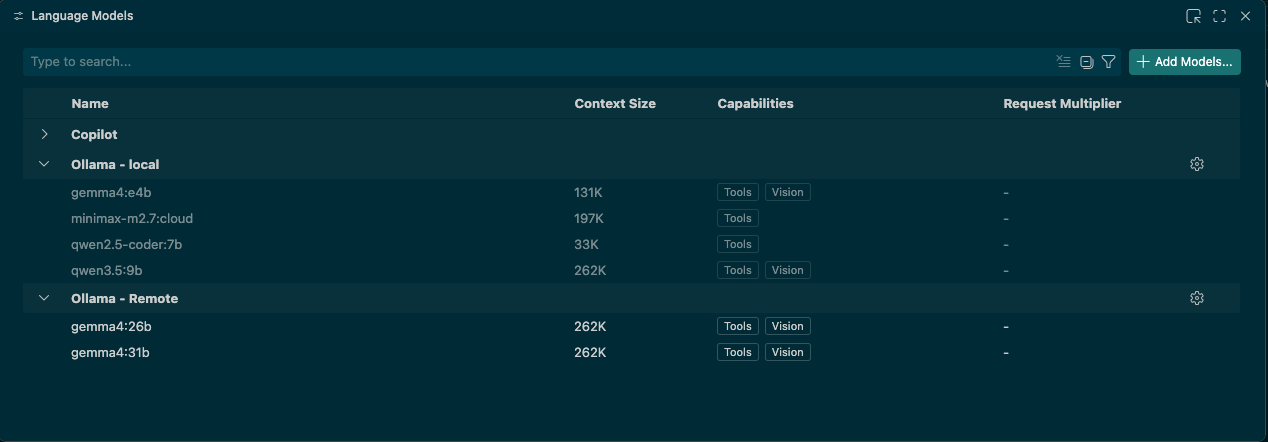
Setting up Ollama with Copilot CLI
If you want to use the Ollama models with Copilot CLI in order to try local Spec Driven Development, you will need to set the following environment variables:
export COPILOT_PROVIDER_BASE_URL=http://<hostname>:11434
export COPILOT_MODEL=<model-name>
For example:
export COPILOT_PROVIDER_BASE_URL=http://my-fantastic-system:11434
export COPILOT_MODEL=gemma4:26b
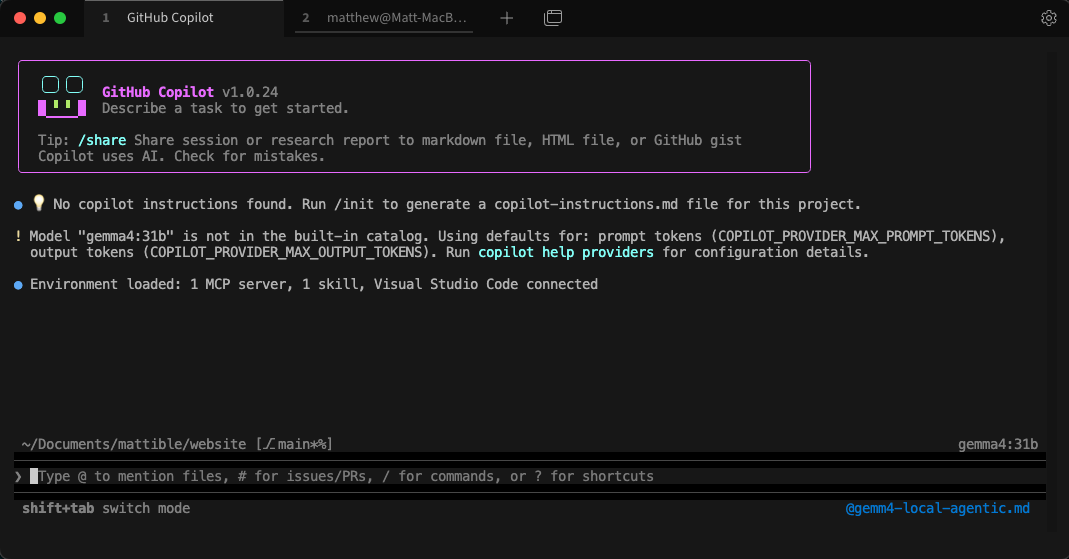
This will allow you to use the Ollama models with Copilot CLI, and you can start using Spec Driven Development with an agentic local model rather than relying on cloud based models, this has been nice for me to test if we are getting to a stage where we can rely on local models for development.
Currently I have only been using Qwen 3 & 3.5 models for testing with local applications to call tool chains for interesting behaviours and non-deterministic behaviours in end user applications, hopefully talk/blog upcoming.
Conclusion
Overall, my experience with Gemma 4 has been very positive. Being able to not worry for token use for more simplistic tasks and code generation has been great.
I am testing with running with a negative keepalive value to allow the model to run indefinitely, this is great for when I am doing more complex code generation tasks where I want to have a more interactive experience with the model, and I do not want to worry about the model timing out or having to restart it for each new prompt.
ollama run <model_name> --keepalive -1
But unfortunately there are still a number of aspects I still default over to Claude for, more specific tasks where the code creation is more specific or complex, where Gemma 4 still struggles to derive the correct answer or the goal of the task / prompt but Claude is able to.
After I run it a bit more I will create a follow up for Spec-Driven Development with local agentic models, and whether it will dethrone my current reliance on cloud based models for this type of work.